1、读取文件内容
(1)read(): 从文件中读取n个字符(在文本模式下)或n个字节(二进制模式下)。如果未指定n,则读取所有内容。
# 示例
f = open('test.txt')
print(f.read(8))    # 读取8个字符
print(f.read())     # 读取全部字符!
f.close()
注意:使用 read() 读取文件时,会将文件的所有内容一次性加载到内存中,这对于非常大的文件来说,可能会给系统内存带来沉重的压力。
(2)readline():从文件中读取一行内容。读取完,文件指针会自动移动到下一行的开头,准备下一次读取。 —— 处理大文件推荐使用
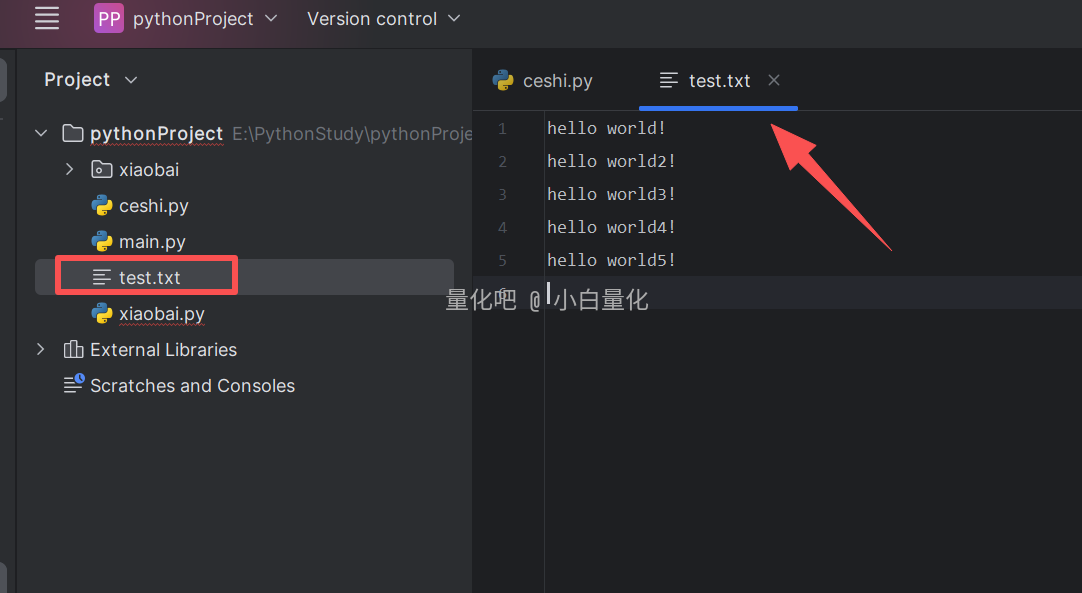
# 示例1
f = open('test.txt')
print(f.readline())
print(f.readline())
print(f.readline())
print(f.readline())
# 示例2
f = open('test.txt')
while True:
line = f.readline()
# 判断读取内容是否为空
if line == "":
# 退出循环
break
print(line)
f.close()(3)readlines():从文件中读取所有行,并将这些行作为一个列表返回,列表中的每个元素都是文件中的一行内容。
# 示例
f = open('test.txt')
content = f.readlines()
print(content, type(content))

for line in content:
   print(line)
f.close()
2、写入内容 write(str)
2.1 访问模式
(1)'r':只读模式(默认模式)。文件必须存在,否则报错。只能读,不能写。
# 示例
f = open("test2.txt")    # FileNotFoundError: [Errno 2] No such file or directory: 'test2.txt'
f = open('test.txt')
print(f.read())

# 只能读不能写
try:
   f.write("hello world")   # io.UnsupportedOperation: not writable 不可写
finally:
   f.close()
   print(f.closed)
(2)'w':只写模式。如果文件存在,则覆盖文件内容。如果文件不存在,则创建文件并写入内容。只能写不能读。
# 示例
f = open("test2.txt", 'w')
f.write("xiaobai")

# 只能写不能读
try:
   print(f.read())    # io.UnsupportedOperation: not readable 不能写
finally:
   f.close()
(3)'a':追加模式。如果文件存在,则将内容追加到文件末尾。如果文件不存在,则创建文件并写入内容。只能写不能读。
# 示例
f = open("test3.txt", 'a')
f.write("\nxiaobai")

# 只能写不能读
try:
   print(f.read())    # io.UnsupportedOperation: not readable
finally:
   f.close()
(4) '+":读写模式。这个符号可以添加到 'r'、'w'、'a'之后,以允许文件同时进行读写操作。
注意:使用'+' 会影响文件的读写效率,开发中更多时候会以只读、只写模式来操作文件。
# 示例
f = open("test4.txt", 'a+')
f.write("\nxiaobai")
print(f.read())     # 读取为"",因为文件指针已经到了文件末尾
f.close()
文件指针的当前位置决定了下一次读取或写入操作将从哪里开始!
2.2 文件定位操作
(1)tell():返回文件指针的当前位置。
(2)seek(0):将文件指针移动到文件开头
# 示例
f = open("test4.txt", 'a+')
print("指针位置:", f.tell())
# 将文件指针移动到文件开头
f.seek(0)
print("指针位置2:", f.tell())
print(f.read())     # 读取为"",因为文件指针已经到了文件末尾
f.write("\nxiaovbai")
f.close()